top of page
Instructional Designer | eLearning Developer

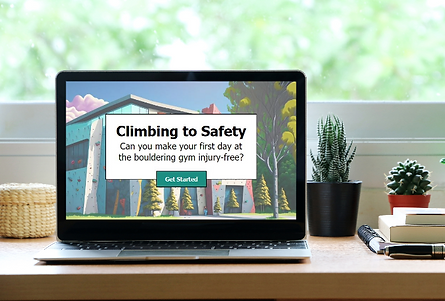
Overview
Audience
First time visitors to the bouldering (rock climbing) gym, "Boulders & Beta."
Tools
Articulate Storyline
Adobe XD
Vyond
Adobe Illustrator
Adobe Express
MindMeister
Google Suite
The Problem
Boulders & Beta is a conceptual bouldering (rock climbing) gym that recently opened and was struggling to retain new visitors. The visitor return rate was significantly lower than projected. Through surveying new visitors via email, the root problem was determined to be that new visitors did not feel prepared to return to the gym because the steps to boulder were unclear and they were afraid of injuring themselves. Although basic information about the gym was given to all new visitors, it was not sufficient to make them feel confident enough to return to the gym.
The Goal
The customer retention rate will increase 20% by the end of 2023 as the gym staff provides a more in-depth orientation to new guests.
The Solution
Once the problem was identified, I needed to figure out the root cause - was the problem caused by the environment, lack of knowledge, lack of skill, or lack of motivation? It was determined that there were two root causes - both a lack of knowledge and lack of skill among guests. Guests were told a lot of information during their first visit and given a short tour, but they did not have any hands-on practice nor any materials to reference to help them remember what was told to them.
To address the lack of both knowledge and skill, I proposed two solutions. The first solution focuses on the lack of materials (knowledge) to reference during the guest’s visit and after they leave. This solution is to design a first visit visual aid/handout with an overview of the gym, climbing information, and various QR codes with more information.
The second solution focuses on both the lack of knowledge and skill. This solution is to design an immersive scenario-based learning experience that allows visitors to practice using the gym in a risk-free environment. This is the solution I will be discussing and showing for the duration of this project overview.
My Process
To plan a scenario-based learning experience, I used the ADDIE model - analysis, design, development, implementation, and evaluation to help ensure that I met the needs of learners (new gym guests). This led me through the following steps as I created the project.
Action Map
Storyboard
Mockups
Prototype
Development
Action Map
For this project, I was the subject matter expert (SME) and thought about what steps my current bouldering gym took during orientation to make me feel confident to return, and what they could have done better. I spoke with new members to my bouldering gym to get their perspective as well. Through the use of an action map, I brainstormed high-priority actions that needed to take place during a guest’s first visit to the gym in order to make them feel confident and comfortable to return. This action map guided the rest of the project development.

Text-Based Storyboard
I went through the actions from the action map and selected the items that were the highest priority because they would have the highest impact on the goal. There were two high priority items - making a visual aid for someone’s first visit and making a scenario-based e-learning to allow guests to practice being in the gym in a risk-free environment. These two items are two separate projects, but the scenario-based e-learning was the highest priority. The visual aid will make the information convenient, organized, and accessible outside of the gym, but all of the information is already available in the gym. There is nothing like the e-learning that already exists, so creating it should have the most impact on the goal.
I created a text-based storyboard that takes the user through five scenarios with the help of a mentor character. These scenarios were decided upon by using the action map. The five scenarios match the top five important points of the gym tour. The scenarios allow the user to practice making decisions in a risk-free environment, and the mentor character provides guidance along the way, if desired by the user.


Visual Mockups
Once the storyboard was revised, I created visual mockups using Adobe XD. I used Adobe Express to create backgrounds using an AI generator. I chose backgrounds with bright colors to mimic an actual bouldering gym. Because the backgrounds used various bright colors, I keep the color scheme of my buttons and text boxes as minimalist as possible.
Once I had the backgrounds, buttons, and text boxes created, I created and animated characters for the story using Vyond. Vyond allows me to change body positions, facial expresions, and actions.
I iterated through the various types of slides I would need until I had at least one slide of each type: introduction, prompt, answer options, mentor, correct answer, incorrect answer, etc. I asked for feedback and made a few changes before moving forward.


Interactive Prototype
After visual mockups were done, I used Articulate Storyline to create an interactive prototype based on the mockups. Articulate Storyline allowed me to add transitions, animations, button hovering effects, motion paths, and a progress tracker. I made several slides with these elements incorporated and then asked for more feedback. I made adjustments to animations, text size, and hovering effects, moving into the full development phase.
Full Development
Once I had feedback from my interactive prototype, it was just a matter of creating more slides with the same interactions that I had already received feedback on.
bottom of page